




Customer Stories
Built from real problems. Proven in the real world.
See how Reji's technology has made an impact across very different businesses. Each use case has been built into our platform to be reused and improved.
Convenience Store Foodservice
Turn made-to-order food into a seamless part of the store
Reji originally built its convenience-store platform to solve a simple problem: take the ordering process out of the kitchen so employees can focus on making food.
Inspired by the self-service experience pioneered by brands like Wawa, Reji created a custom ordering experience for CEFCO that connected the customer, kitchen and checkout into one seamless workflow.
Order. Shop. Pick Up. · 0:40Watch on its own page
- Step 1 Kiosk Order Customers build and customize their food
- Step 2 Kitchen Preparation The order goes straight to the kitchen
- Step 3 Customer Shops They keep shopping while food is made
- Step 4 Barcode Checkout One scan at the register, with everything else
- Step 5 Food Pickup Hot, fresh and ready to go
Order. Shop. Pick Up.
Customers build and customize their food on an easy-to-use touchscreen designed to naturally encourage modifiers and upsells. A basic $4 burrito, for example, can become a $12 customized order as customers add proteins, toppings, sides and extras.
Once submitted, the order goes straight to the kitchen while the kiosk prints a barcode receipt. The customer keeps shopping while their food is prepared, brings any other items to the register, and scans the food-order barcode during their normal checkout.
No second checkout. No waiting at the kitchen counter. No disruption to the existing store experience.
Built Around the Kitchen, Not Just the Customer
We didn't stop at the kiosk. Reji's Kitchen Display System was designed around how employees actually prepare food. Menu components and preparation steps can be organized to match the physical layout of a store's hot bar and kitchen.
Instead of sending employees back and forth between ingredients, the software can present preparation steps in the same order employees physically move through the kitchen.
Faster preparation, less unnecessary movement and easier employee training.
Increase the Ticket Without Increasing the Pressure
Self-service creates an opportunity to increase average order value without employees constantly upselling. The ordering experience can present:
- Add-ons
- Modifiers
- Premium proteins
- Toppings
- Sides
- Combos
- Upgrades
Customers stay in control while the platform consistently presents opportunities to build a larger order.
Works With the Technology You Already Have
Convenience stores run complex technology, from POS and payment systems to fuel processing and back-office infrastructure. Reji was designed to integrate around that environment rather than force retailers to replace it.
That allowed us to deploy self-service food ordering for CEFCO and smaller convenience-store operators without interfering with their existing branded fuel-processing infrastructure.
Order in English or Español
Convenience stores serve everyone who walks through the door. For CEFCO, Reji put an English and Español choice on every screen, so customers could switch languages at any point and keep building the same order.
Reji supports multiple languages across the ordering experience, from the welcome screen and food groups to buttons and checkout, so each location can offer the languages its customers speak.
Inside the Store
CEFCO Kitchen and Wingfingers counters, and the ordering screens Reji built in English and Spanish.




Experience That Became a Platform
What started as a custom solution for convenience-store foodservice became reusable technology within the Reji platform. Today, retailers get proven building blocks for:
- Self-Service Ordering
- Kitchen Displays
- Intelligent Upselling
- Barcode Checkout
- POS Integration
- Menu Management
- Hardware Integration
- Multi-Location Deployment
- Multi-Language Ordering
Every new deployment starts with years of lessons already built into the platform, not a blank sheet of paper.
CEFCO in the News
Coffee and Specialty Beverage
Make complex drink ordering feel simple
Coffee and specialty drinks can have some of the most complicated ordering workflows in foodservice. Size, milk, syrups, flavors, toppings, temperatures and quantities all need to come together without overwhelming the customer or the team making the drink.
For InsomniCup in Baker, California, Reji built a kiosk-first ordering experience specifically around the way customers customize drinks.
Complex Drinks, Simple Ordering · 0:46Watch on its own page
- Step 1 Here or To Go Customers start at the kiosk
- Step 2 Customize One decision at a time, with smart defaults
- Step 3 Pay at the Kiosk Card at the kiosk, cash at the drive-thru
- Step 4 Labels Print One label per drink, grouped by order
- Step 5 Hand Off Every drink stays with its order
Step-by-Step Drink Customization
Instead of presenting customers with a wall of modifiers, Reji guides them through their drink one decision at a time:
- Size
- Milk
- Syrups
- Flavors
- Add-Ons
- Review
Images can be attached to categories and individual drinks for a visual ordering experience, while default ingredients clearly show customers what already comes with their selection.
A complex menu that still feels simple to order.
Smart Defaults and Modifier Pricing
Customization gets complicated when the customer wants something different from the recipe. If a drink normally includes three pumps of vanilla, Reji knows three pumps are included.
A simple stepper lets the customer ask for fewer or more pumps, while the platform tracks the original recipe and charges only when the customer goes past the included amount. The same logic works across any configurable ingredient or modifier.
Built for the Barista Workflow
Once an order is placed, Reji keeps every drink connected to the original order while printing an individual preparation label for each one. For a three-drink order, each label can show the order number, drink details, customizations and its place in the order:
Baristas get what they need at the point of preparation, and multiple drinks from the same customer stay together.
Kiosk-First Checkout
InsomniCup was designed around kiosk ordering rather than a traditional front-counter POS.
Reji designed the flow so customers selected Here or To Go, customized their drinks and paid by card right at the kiosk. Customers who wanted to pay with cash were directed to the drive-thru counter for help.
Fast, self-service ordering without giving up other ways to pay.
The complexity stays behind the scenes, so ordering a highly customized drink still feels simple.
Inside InsomniCup
The counter, the kiosks and the screens Reji built for customizing drinks.



Built From Real Beverage Operations
The InsomniCup project expanded the Reji platform with capabilities designed specifically for coffee and specialty beverage businesses:
- Visual Menus
- Drink Recipes
- Smart Defaults
- Milk and Syrup Modifiers
- Quantity Steppers
- Incremental Modifier Pricing
- Integrated Card Payments
- Here or To Go
- Drink Label Printing
- Multi-Drink Order Grouping
Restaurants and QSR
Simplify ordering from the customer to the kitchen
When Mad Greek, a high-traffic restaurant in Baker, California between Las Vegas and Los Angeles, wanted to introduce self-service ordering, the challenge went beyond simply adding kiosks.
Their existing Micros POS wasn't delivering the experience they wanted, their menu was complex, and orders needed to move efficiently through multiple kitchen stations. Reji built an ordering and POS experience around how their restaurant actually operates.
Built Around Your Kitchen · 0:47Watch on its own page
- Step 1 Build the Order Customers order at a self-service kiosk
- Step 2 Dine In or To Go Guests choose how they're eating
- Step 3 Pay at the Kiosk To-go guests enter their pager number
- Step 4 Station Routing Each item goes to the right prep station
- Step 5 Order Up The full order comes together for the guest
One Experience for Customers. A Simpler One for Employees.
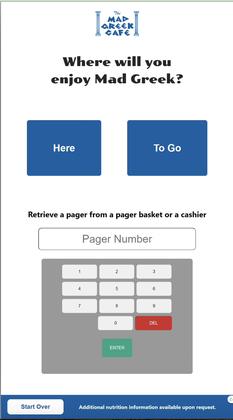
Reji designed the experience so customers could walk in, build their order at an intuitive self-service kiosk, choose Dine In or To Go, and pay right at the kiosk. For takeout, customers grabbed a pager and entered its number during checkout, giving the kitchen a simple way to match the customer to the order.
At the counter, Reji created a streamlined employee checkout on the same platform. Instead of an unnecessarily complex POS interface, the workflow focuses on what employees actually need to complete an order.
Fewer steps. Less training. Faster ordering.
Payments Without Starting Over
Adding kiosks shouldn't require a restaurant to replace a payment relationship that already works.
Reji integrated the kiosks with Mad Greek's existing payment processor, so the restaurant could introduce self-service payments without disrupting its existing processing environment.
That flexibility created another opportunity: evaluate kiosk processing independently and find more competitive rates as the business grows.
Complex Orders. Smart Kitchen Routing.
Behind the scenes, an order may be anything but simple. A single customer order could include a gyro, fries, salad and a shake, each prepared in a different part of the restaurant. Reji keeps the order connected while routing each item to the right production station:
- Gyro
- Fryer
- Salad
- Shakes
- Other Prep Stations
Kitchen teams see exactly what they need to prepare without losing sight of the full customer order.
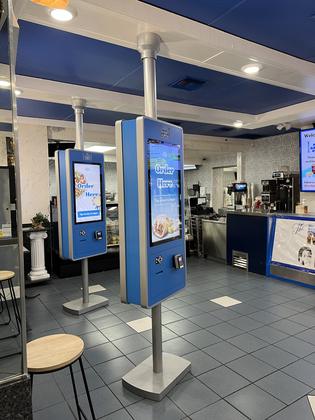
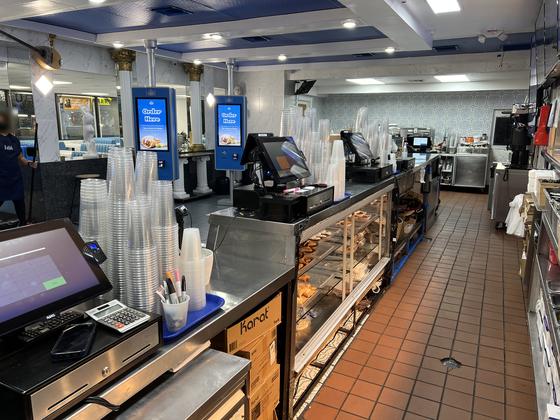
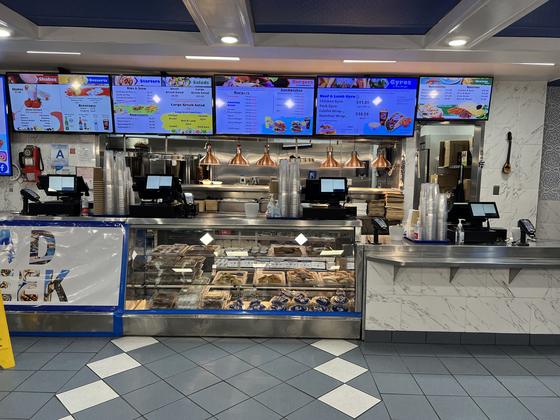
Inside Mad Greek
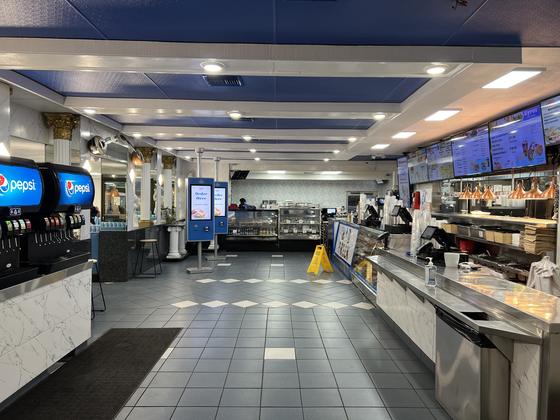
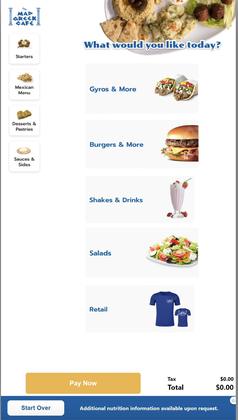
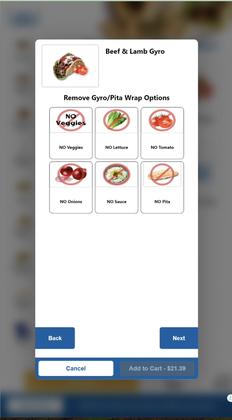
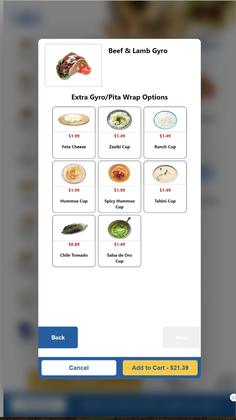
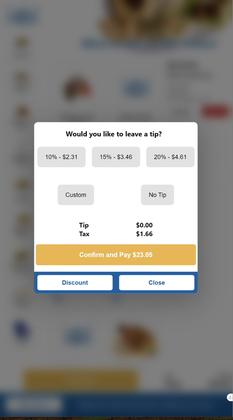
The kiosks, the counter, the kitchen displays and the screens Reji built for ordering a gyro meal.




Fast-Casual Counter: One Price Book, Two Ways to Order
A fast-casual dogs, burgers and salads counter wanted self-ordering kiosks alongside its existing counter service. Its items and prices already lived in its PDI price book, and its accounting depended on every sale landing in PDI.
Managing a second menu by hand would have meant prices drifting out of sync between the kiosk and the register.
PDI Integration, Both Directions
Reji integrated with the operator's PDI price book, so items and item pricing synced to the kiosks automatically. A price change made in PDI showed up on every kiosk without anyone rebuilding the menu.
Completed kiosk orders were pushed back to PDI asynchronously for accounting, so customers never waited on the back office while sales still reconciled alongside everything else.
- Price Book Sync
- Automatic Pricing
- Order Push to PDI
- Loyalty Lookup
At the Counter
Countertop and freestanding kiosks, and the ordering screens Reji built, from breakfast to combos and loyalty.


Design your technology around your kitchen, instead of redesigning your kitchen around your technology.
Built for the Restaurant You Actually Run
Restaurant technology shouldn't force every operation into the same workflow. Mad Greek needed complex menus, self-service ordering, employee POS, dine-in and takeout workflows, pager identification, integrated payments and multi-station kitchen routing. The fast-casual counter needed its PDI price book and accounting connected to the kiosk. Those lessons are now reusable capabilities within the Reji platform:
- Self-Service Kiosks
- Employee POS
- Complex Menus and Modifiers
- Dine-In and Takeout
- Integrated Payments
- Kitchen Displays
- Station Routing
- Pager Workflows
- PDI Price Book Sync
- Back-Office Order Push
- Hardware Integration
Whether you run one high-volume restaurant or many locations, Reji provides the building blocks and adapts them to the way your operation works.
Food Trucks and Mobile Foodservice
Take the order line outside the truck
Food trucks have the same ordering complexity as restaurants, but without the same infrastructure. Reliable internet, payment processing, kitchen connectivity, limited space and constantly changing locations all create challenges for traditional self-service technology.
Reji approached the problem differently. We introduced a cellular-connected kiosk solution with its own local network, so mobile food operators can run self-service ordering without depending on the infrastructure wherever they park.
Order Anywhere You Park · 0:59Watch on its own page
Park. Connect. Start Taking Orders.
- Step 1 You choose your payments Keep what works or use ours
- Step 2 We build your menu With upsells and modifiers built in
- Step 3 You choose kitchen printing At the kiosk or inside the truck
- Step 4 Reji connects it all Cellular outside, local network inside
Start With the Payments That Work for You
A food truck shouldn't have to change its entire payment operation just to add self-service. Reji gives operators flexibility in how they get paid:
- Square or ZelleKeep the payment workflows you already use
- Shift4Our integration for established brands
- StripeA fully managed payment and payout experience
Don't make payments the barrier to getting started.
Turn a Menu Into a Sales Tool
Whether it's a simple menu or one full of sizes, proteins, toppings, modifiers, combos and add-ons, Reji builds the ordering experience around what the operator actually sells.
Instead of relying on someone inside a busy truck to remember every upsell, the ordering flow consistently presents:
- Add-Ons
- Extras
- Combos
- Premium Options
- Modifiers
- Upgrades
The customer controls the order while the operator gets another chance to lift the average ticket.
Choose How the Kitchen Receives Orders
Every food truck operates differently, so Reji doesn't force one kitchen workflow. Operators can have a second kitchen receipt print right from the kiosk, or route orders to a kitchen printer inside the truck.
That second option raises a question: how does a kiosk sitting outside talk reliably to equipment inside a mobile kitchen?
Cellular Outside. Local Network Inside.
The kiosk creates a local network, so supported equipment inside the truck, like the kitchen printer, talks to the kiosk locally while the whole system stays connected over cellular. No networking to build out every time the truck moves.
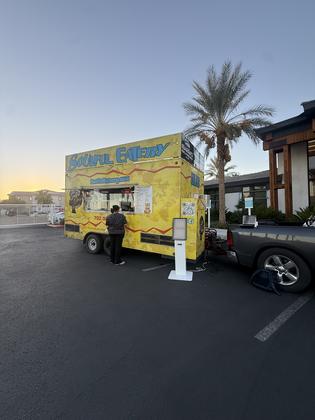
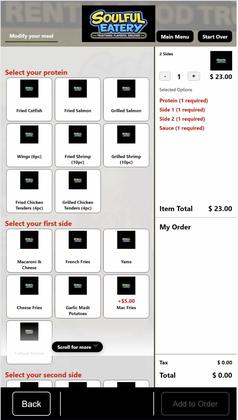
On Location With Soulful Eatery
A freestanding kiosk set up beside the trailer, and the ordering screens Reji built for its soul food combos.



Reji Handles the Technology Connecting It All
The operator chooses their payment strategy. We implement their menu and upsell experience. They choose how orders reach the kitchen. Reji connects the rest:
- Cellular Connectivity
- Local Networking
- Flexible Payments
- Complex Menus
- Upselling
- Kitchen Printing
- Remote Management
- Mobile Deployments
From a permanent restaurant to a truck that may be somewhere different tomorrow, the Reji platform goes where the business goes.
Bakery and Specialty Retail
Made to order. Built around your menu.
Self-service ordering that handles everything from a single slice to a fully customized cake.
Bakery menus aren't always straightforward. Between cake sizes, flavors, seasonal selections, personalized messages and custom requests, traditional ordering systems can struggle with the complexity. Reji built a self-ordering kiosk solution that makes it easy for customers to browse, customize, order and pay, while giving the bakery the flexibility to manage its unique products.
- Step 1 Browse the menu Categories and subcategories, from mini to seasonal cheesecakes
- Step 2 Choose size and options Pricing adjusts automatically with every selection
- Step 3 Personalize it Build your own cake and add a message to write on it
- Step 4 Pay at the kiosk Order and payment in one self-service experience
- Step 5 Custom orders, too Enter an order number and pay in full or a deposit
Complex Menus, Made Simple
From cheesecakes to specialty cakes, Reji supports multiple levels of categories and subcategories. Customers explore selections like mini cheesecakes and seasonal cheesecakes, choose their preferred size, and see pricing adjust automatically based on what they pick.
- Categories
- Subcategories
- Sizes
- Flavors
- Seasonal Selections
- Size-Based Pricing
Personalization Built In
Customers can build their own cakes, select from the available options and enter a personalized message to be written directly on the cake.
The ordering experience adapts to the bakery's offerings, not the other way around.
Custom Orders. Seamless Payments.
Not every cake can be ordered from a standard menu. For fully custom creations or catalog orders that need help from bakery staff, Reji built an order-number payment workflow that is now part of the platform.
Once the bakery creates the order, the customer enters their order number at the kiosk, the amount due is retrieved automatically, and they pay right there, with no separate checkout. Customers can pay for the cake in full or pay a deposit, because the payment process for custom orders is configurable to match how your bakery works.
Custom work from your staff, paid in full or by deposit at the kiosk.
Almost Heaven Desserts & Coffee Shop: A Kiosk in the Lane
Almost Heaven Desserts & Coffee Shop wanted drive-thru customers to order on their own from a kiosk beside the lane, with the full menu of desserts, coffee, paninis, salads, acai bowls and more.
A drive-thru kiosk has a problem a counter kiosk doesn't: a driver in a compact car and a driver in a pickup reach the screen at very different heights.
A Screen That Meets Every Driver
Reji built the ordering experience to adjust to the car. The kiosk used a tall outdoor screen, and the ordering panel appeared wherever the driver touched it, so it sat within reach from a low sedan or a high truck cab.
Arrow tabs above and below the panel let the driver nudge it up or down at any point in the order, while the rest of the screen showed the bakery's own imagery.
The screen comes to the driver, not the other way around.
Printed in the Kitchen. Rung Up at the Window.
Every drive-thru order was sent straight to a kitchen printer, so the team could start preparing it before the car reached the window. When the customer pulled up, the order was rung up on the bakery's existing POS system at the window, so the shop kept the register and processes it already used.
- Drive-Thru Kiosk
- Touch-to-Position Ordering
- Kitchen Printing
- Pay at the Window
- Works With Your Existing POS
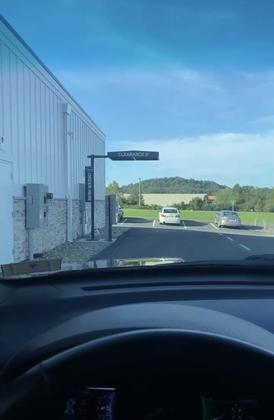
At the Almost Heaven Drive-Thru
The kiosk in the lane and the screens Reji built for drivers, from the welcome screen to choosing how to pay.





Built for Anything Made to Order
The same capabilities fit any business selling customizable products:
- Bakeries
- Florists
- Gift Shops
- Specialty Food Retailers
- Made-to-Order Businesses
Your menu doesn't have to fit our technology. Our technology is built to fit your menu.
One Platform. Endless Possibilities.
Whether it's a simple cheesecake, a personalized birthday cake or a custom creation that needs staff help, Reji brings ordering, customization, complex pricing and payments together in one flexible self-service experience:
- Multi-Level Categories
- Size-Based Pricing
- Build-Your-Own Products
- Personalized Messages
- Order-Number Payments
- Full or Deposit Payments
- Integrated Payments
- Drive-Thru Ordering
- Kitchen Printing
Attractions and Ticketing
Self-service ticketing built around the way your attraction operates
From amusement parks to seasonal attractions, Reji makes it easier for guests to buy tickets, pay by card and get on with the fun, while your team spends less time taking payments and more time with guests.
- Step 1 Choose A single ride or a 10-ride punch card
- Step 2 Donate Add an optional donation
- Step 3 Pay by Card Through the park's own merchant account
- Step 4 Print A physical ticket or punch card
- Step 5 Ride Ready to use at the attraction
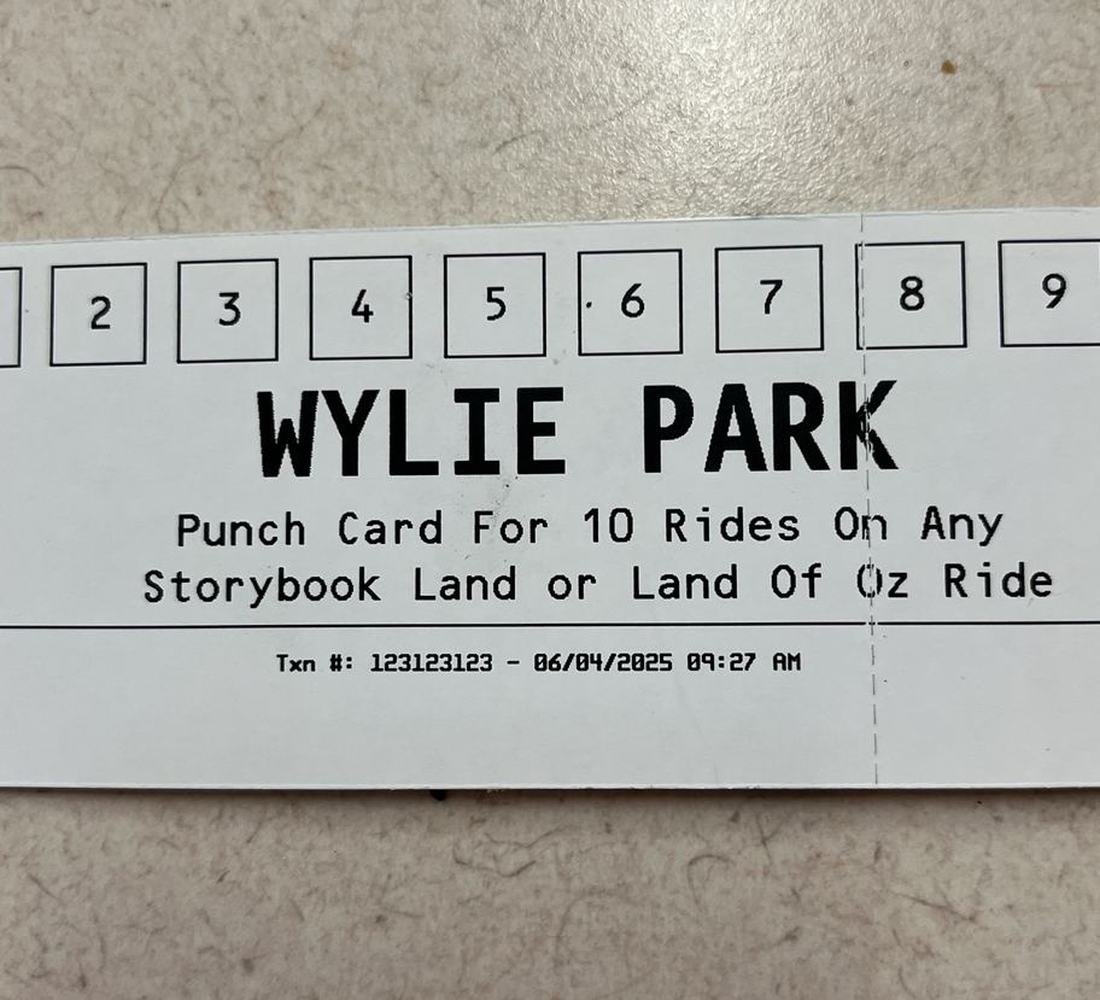
Wylie Park Storybook Land: Self-Service Ride Tickets
Wylie Park Storybook Land (opens in a new tab), a seasonal amusement park in Aberdeen, South Dakota, wanted a convenient way for visitors to buy ride tickets on their own, so staff wouldn't have to take every purchase.
The park offered both individual ride tickets and 10-ride punch cards, with the added option for guests to make a donation.
They also wanted to keep using their existing merchant account rather than introducing a separate payment system.
Custom Self-Service Ticketing on the Olea Geneva
Reji developed a custom self-service ticketing experience on the Olea Geneva kiosk (opens in a new tab), an indoor and outdoor kiosk purchased from Olea Kiosks.
Guests could walk up to the kiosk, select a single ride or a 10-ride punch card, add an optional donation and pay with a credit or debit card. The kiosk then printed a physical ticket or punch card ready for use at the attraction.
Payments ran through Reji's CardConnect integration. Because the park already processed with CardConnect, getting the kiosk ready to take cards was as easy as ordering one more CardConnect Bolt device. Kiosk sales went through the park's existing merchant account, alongside the rest of their sales.
On Location at Wylie Park
The kiosk, the screens Reji built for guests and the tickets it printed.


Built for the Way They Operate
Not every business fits into a traditional point-of-sale system.
More Than Just Ticket Sales
Reji combines flexible software, hardware integrations, payment connectivity and custom development to create self-service solutions tailored to real-world operations.
Whether you're selling ride tickets, admission passes or building a completely different self-service experience, we'll help you put the right pieces together.
Have a unique self-service project? Let's build it.
Cash Is Still King
The world may be moving toward digital payments, but cash still matters
The problem isn't accepting cash. The challenge is making it work inside a modern, unattended self-service experience.
We've worked on projects where the complexity of cash integration put the requirement itself at risk. Instead of eliminating cash, Reji integrated the hardware, existing APIs, payment flows and business systems needed to keep it part of the experience.
Cash isn't going away. We make sure your technology doesn't leave it behind.
- Step 1 Find or Build Pick a trip or build an order
- Step 2 Pay With Cash Or card, at the same kiosk
- Step 3 Exact Change The right mix of bills and coins
- Step 4 Print Tickets and receipts on the spot
- Step 5 Stay in Sync Every transaction flows to your existing systems
Greyhound / Flix: Cash for Modern Ticketing
When Reji built a complete self-service ticketing solution for Greyhound/Flix, the new experience had to integrate deeply with their existing ticketing infrastructure while supporting travelers who still relied on cash.
The deployment used Olea's Franklin kiosk, with several specialized components that had to work together:
- Cash Acceptance
- Bill Dispensing
- Coin Dispensing
- Card Payments
- Custom Printing
Reji integrated with the existing hardware APIs and orchestrated those components within the ticket-buying experience. A traveler could find their trip, buy a ticket with cash, get the correct mix of bills and coins as change, and have their ticket and receipt printed, all while the transaction stayed connected to Greyhound/Flix's existing systems.
What could have been a reason to eliminate cash became part of the modern self-service experience.
We didn't replace cash. We kept it moving.
From Product Selection to Cash Checkout
The same challenge appeared in an entirely different industry. For a cannabis retail solution, Reji integrated a G&R cash-accepting kiosk equipped with a CPI Paypod all-in-one cash unit.
This time, cash was only one piece of a much larger integration. Reji connected the kiosk directly to the retailer's existing POS, so the self-service experience pulled available products from the system already running the business.
Customers browsed inventory through a fully customized interface, built their order, and chose cash or credit at checkout. Cash was handled through the Paypod integration, while completed orders flowed back into the existing POS, keeping it the source of truth for products and transactions.
One customer experience. Two ways to pay. No separate retail ecosystem to manage.
Tribal Casino: Cash-Friendly Employee Dining
At a tribal casino resort where much of the business runs on cash, the employee dining room needed a kiosk that could take team members' orders and send them straight into the casino's Oracle MICROS POS.
Reji connected the kiosk to MICROS through our Olo integration. Team members ordered at the kiosk and paid with cash or card, with card payments processed by Worldpay through Reji's triPOS integration.
- Cash Acceptance
- Card Payments
- Worldpay triPOS
- Olo
- Oracle MICROS
- Item Mapping
Every sale imported directly into MICROS for accounting, and each item went to the kitchen exactly the way it was already set up in MICROS.
The key was item mapping. Reji mapped each kiosk item to its MICROS item ID and fit it into a menu built for easy ordering. Prices stayed in sync, and when an order was pushed back, MICROS recognized every item and knew exactly what to do with it.
Cash at the kiosk. MICROS in the back. One order flow in between.
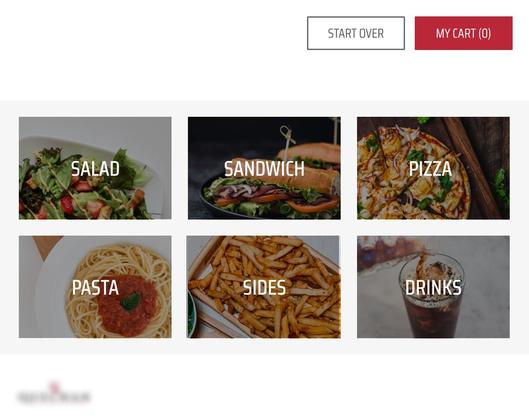
Cash in Action
Kiosks and screens from these cash deployments, from dispensary checkout to employee dining and bus tickets.




Cash Doesn't Have to Hold Self-Service Back
Different industries. Different hardware. Different workflows. The common problem was the same:
How do you modernize self-service without leaving cash customers behind?
Reji brings experience integrating:
- Cash Acceptors
- Bill Dispensers
- Coin Dispensers
- Cash Recyclers
- Card Readers
- Custom Printers
- POS Systems
- Ordering Platforms
- Enterprise APIs
Sometimes innovation isn't about replacing what's old. It's about making sure what's still important works with what's next.
Health and Wellness
More than transactions
Not every kiosk needs to sell something. Reji's platform was adapted to power a completely different self-service experience: a health and wellness kiosk integrated directly with a blood pressure device.
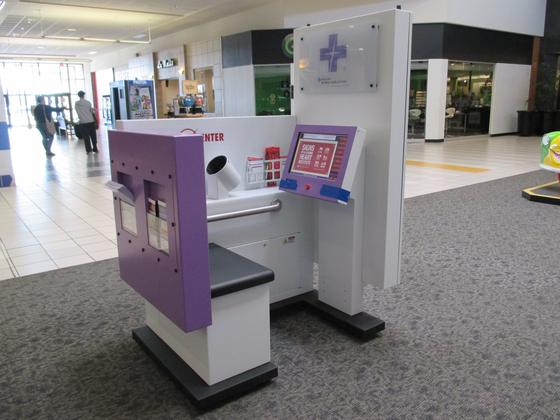
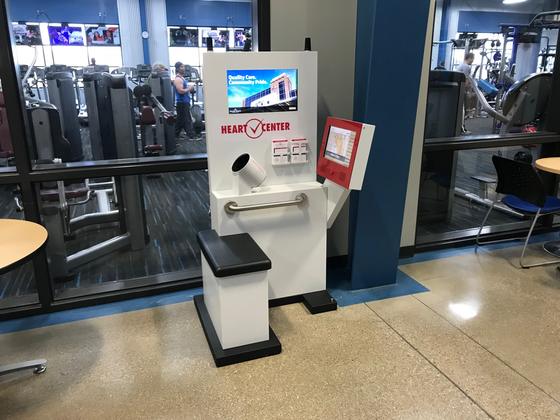
Think of the blood pressure station you might find inside a pharmacy, but with a custom interactive experience, digital intake, BMI testing, web access and a second display dedicated to managed promotional content.
The platform isn't built around one industry. It's built around creating and managing unattended experiences.
- Step 1 Patient Questions A few quick questions to start
- Step 2 Blood Pressure Test Started right from the Reji screen
- Step 3 Results Returned from the device to the custom UI
- Step 4 BMI An optional BMI assessment
- Step 5 Intake and Resources Online intake forms and health websites
Blood Pressure Device Integration
Reji built a custom touchscreen experience that communicates directly with the blood pressure hardware. A visitor sits down, answers a few questions, places their arm in the blood pressure machine, and starts the test right from the Reji interface. Results come back from the device and appear in the custom UI.
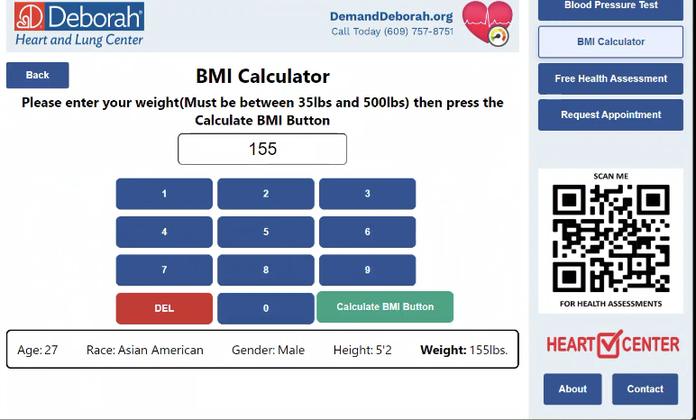
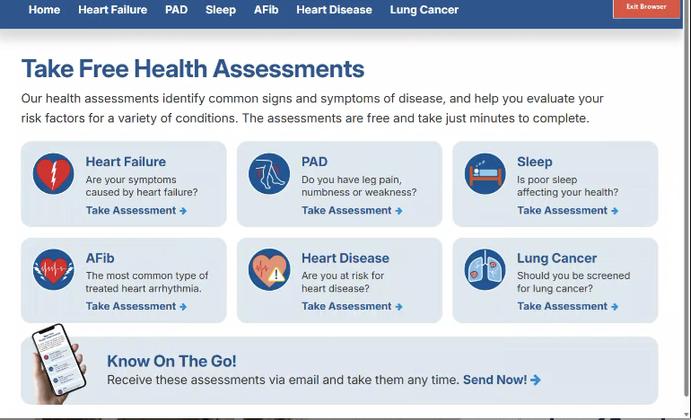
The experience can go beyond blood pressure. Visitors can also complete a BMI assessment, fill out targeted online intake forms, or visit designated healthcare websites.
One kiosk becomes an interactive health engagement point, not just a standalone blood pressure machine.
Healthcare Outreach Beyond the Hospital
The kiosk gives healthcare organizations a physical presence where potential patients already spend their time. A hospital or health system could place branded wellness kiosks in:
- Shopping Centers
- Pharmacies
- Recreation Centers
- Community Centers
- YMCA Locations
- Employer Campuses
Visitors get useful health tools, while the healthcare organization shares relevant information, services, intake forms and calls to action right through the experience.
A Second Screen Becomes a Digital Billboard
On mall kiosks, Reji added a tall display to the outside of the kiosk, facing the walkway. It played the health system's own ads, from a nearby specialty practice to a PAD awareness message inviting shoppers to assess their risk at the kiosk, so the kiosk kept marketing even when no one was sitting at it.


Healthcare organizations can use the same display to promote services, physicians, wellness programs, screenings, community events or other campaigns while visitors use the main touchscreen.
And the content doesn't have to be managed at the kiosk.
Manage the Experience From Anywhere
Reji's backend manages the digital assets behind the experience, so content can change without visiting each kiosk. Organizations can centrally manage and update:
- Advertisements
- Promotional Media
- Campaigns
- Intake Destinations
- Web Experiences
- Kiosk Content
A hospital could switch a campaign across every kiosk as its marketing priorities change, turning each installation into both a health resource and a remotely managed digital engagement channel.
Wellness Kiosks on Location
Kiosks in malls, a fitness center and a hospital hallway, the outward-facing ads, and the screens Reji built for blood pressure, BMI and health assessments.








One Platform. A Completely Different Experience.
- Shopping cart
- Checkout
- Payment processor
- POS
None of it. Instead, Reji is coordinating medical hardware, custom user interfaces, health calculations, digital forms, web experiences, multiple displays and remotely managed content.
That's exactly the point. Reji's platform adapts to the experience an organization needs, instead of forcing every organization into an experience we've built before.
- Medical Device Integration
- Blood Pressure Testing
- BMI
- Digital Intake
- Custom UI
- Multi-Screen Experiences
- Outward-Facing Ad Displays
- Remote Asset Management
- Web Integration
Different use case. Same platform. Built around the experience.
Digital Signage and Content Management
Beyond the touchscreen
Digital signage and screen management, powered by one flexible platform.
Not every screen needs to take an order, accept a payment or respond to a touch. Sometimes the goal is simply to communicate the right information, in the right place, at the right time.
Reji developed a digital signage solution for a Native American reservation that needed to manage content across conference rooms, offices, televisions and other displays throughout its facilities.
- Step 1 Select a device Every screen is listed in the management portal
- Step 2 Choose its content A video, an image or a digital office sign
- Step 3 Update the details Name, title, photo, room number and specialties
- Step 4 Publish remotely No technical help and no trip to the screen
- Step 5 The screen updates Each display keeps its own content and layout
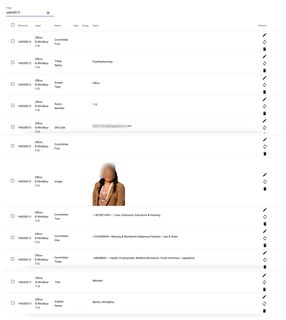
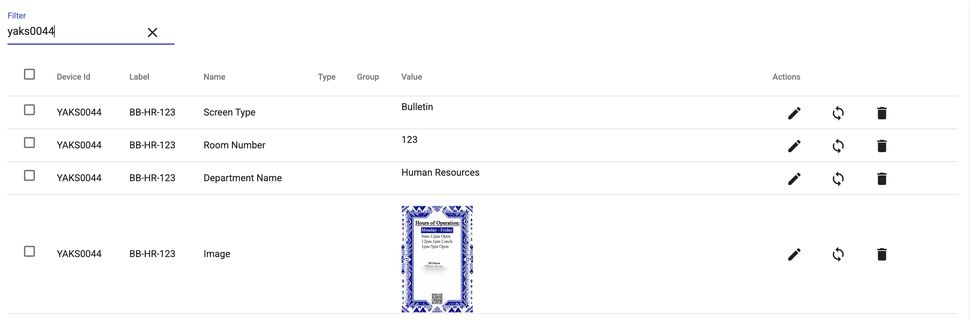
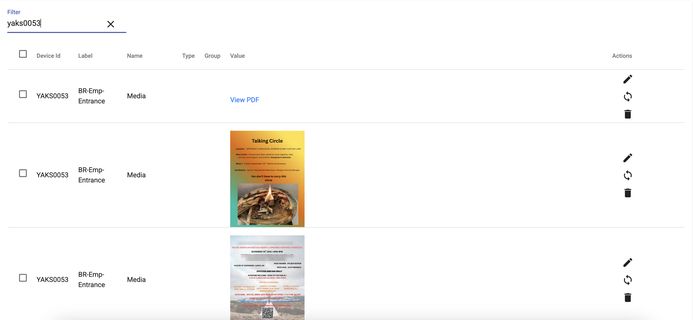
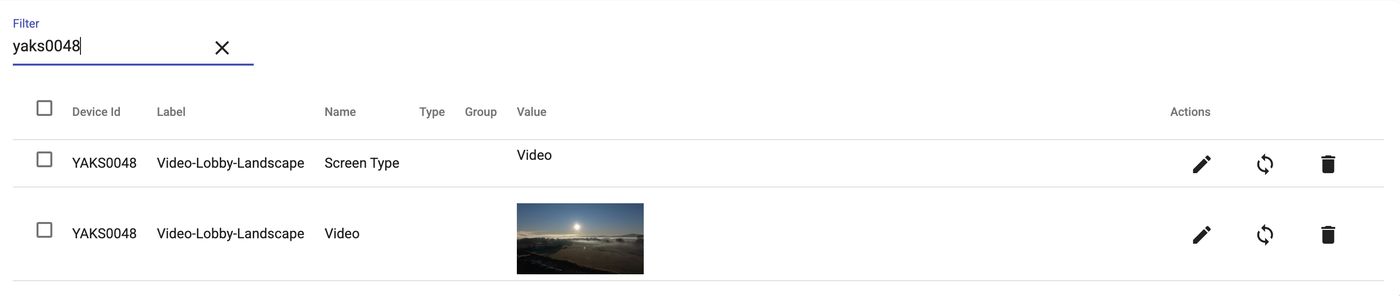
Screens Across the Facility
Office signs, department signs, a lobby video display and rotating employee bulletins, each managed from one portal.


Every Screen Has a Purpose
Some screens play promotional or informational videos. Others serve as digital office signs, showing a person's name, title, photo, room number and areas of specialty.


Instead of printed signage or updating each device by hand, Reji created a centralized, device-driven content management system that lets administrators control what appears on every screen.
Update Content Without the Complexity
Through Reji's management portal, authorized users select a device and update its content without technical help, whether that's replacing a video, changing an office assignment, updating a photo, or editing a person's title and specialties.
- Conference Room APromotional video
- Office 214Office sign
- Main Lobby TVInformational video
- Office 118Office sign
Each device keeps its own content and configuration, so screens with different purposes are easy to manage across an entire facility.
From the Portal to the Screen
Every field on a screen comes from an entry in the portal: office signs, department signs, rotating bulletins and lobby video.


For Any Facility With Screens to Manage
The same capabilities fit organizations that need more than conventional kiosk functionality:
- Corporate Offices
- Hospitals
- Government Facilities
- Hotels
- Schools
- Conference Centers
One Platform. More Than Transactions.
The same flexibility that powers Reji's self-ordering kiosks extends to noninteractive displays and digital signage. From conference room information and office directories to promotional videos and informational screens, Reji provides a centralized way to manage digital experiences across locations and devices:
- Centralized Content Management
- Device-Specific Content
- Remote Video and Image Updates
- Configurable Layouts and Fields
- Digital Office Signs and Directories
- Multi-Screen Management
- Noninteractive Displays
Not every screen needs to be interactive. Every screen should be easy to manage.
Enterprise and Custom Solutions
What do you need the kiosk to do?
Sometimes the use case doesn't fit neatly into a category. That's where Reji started.
Our platform was built through years of solving different problems across convenience stores, restaurants, transportation, specialty beverage, healthcare, retail, food trucks and other unattended environments. Each project brought a new challenge: a new peripheral, a new payment processor, a new API, a new workflow.
That experience became part of the platform.
Bring Us the Hardware
A kiosk is more than a touchscreen. Reji has experience integrating the peripherals that turn a screen into a complete self-service solution:
- Barcode and ID Scanners
- Receipt and Label Printers
- Cash Acceptors
- Bill and Coin Dispensers
- Cash Recyclers
- Payment Terminals
- Pagers
- Medical Devices
- Kitchen Printers
- Secondary Displays
- Cellular Hardware
Whether it's one device or several pieces of hardware working together in a single transaction, Reji provides the software layer that brings the experience together.
Keep Your Payment Relationships
Enterprise organizations often already have established payment relationships. Adding a kiosk shouldn't automatically mean replacing them. Reji has worked across major payment ecosystems and semi-integrated solutions, including:
- Fiserv
- Worldpay
- Shift4
- FreedomPay
- Ingenico
- Verifone
- CardConnect
- triPOS
- Stripe
The customer experience stays within Reji while supported payment hardware and processors securely handle the payment itself. For smaller operators, we help find the right path. For enterprises, we work within the relationships and infrastructure already in place.
Connect the Systems Behind the Experience
Payments are only one integration. Reji can sit between the customer experience and the systems already running the business:
- POS
- Loyalty
- Catalogs
- Inventory
- Ticketing
- Kitchen Systems
- Back Office
- Enterprise APIs
- Web Services
- Custom Hardware
Instead of creating another isolated system to manage, Reji uses your existing platforms as the source of truth and builds the self-service experience around them.
When we connect to another system, we use its own unique identifiers for every item and map them to Reji's menu structure. Customers get an ordering flow designed to be easy to follow, and every order goes back in a form your system already understands, with the right items, prices and kitchen routing.
Your systems keep running your business. Reji connects the experience to them.
From One Location to Enterprise Scale
Not every customer needs hundreds of kiosks, and not every customer needs one. Reji is designed to support both.
Start with what the business needs. Build the technology around it.
Hardware Without the Handcuffs
Reji isn't built around one kiosk manufacturer. We work with leading kiosk manufacturers across the United States, so we can match the physical hardware to the environment instead of forcing every project into the same enclosure.
- Countertop
- Freestanding
- Wall-Mounted
- Indoor
- Outdoor
- Cash-Enabled
- Purpose-Built
Choose the hardware that fits the use case. We'll make the experience work.
One Platform. A Lot of Possibilities.
Our experience across industries has created a platform that brings together:
- Custom UI
- Hardware
- Payments
- Loyalty
- APIs
- POS
- Peripherals
- Connectivity
- Remote Management
- Enterprise Systems
From a single kiosk for a local operator to a highly customized enterprise deployment, Reji provides the technology between what you already have and what you want to build.
Your use case doesn't have to fit our platform.
Our platform is built to fit your use case.
Convenience stores, restaurants, specialty beverage, food trucks, bakeries, attractions and ticketing, cash automation, healthcare, digital signage and enterprise. One Reji platform behind all of it.
Tell Us About Your Use Case